
Medico-legal work has always run on paper. Records arrive in boxes, bundles get printed, copied and couriered, and files sit in storage long after a case has closed. We spent years working that way ourselves, which is exactly why we changed.
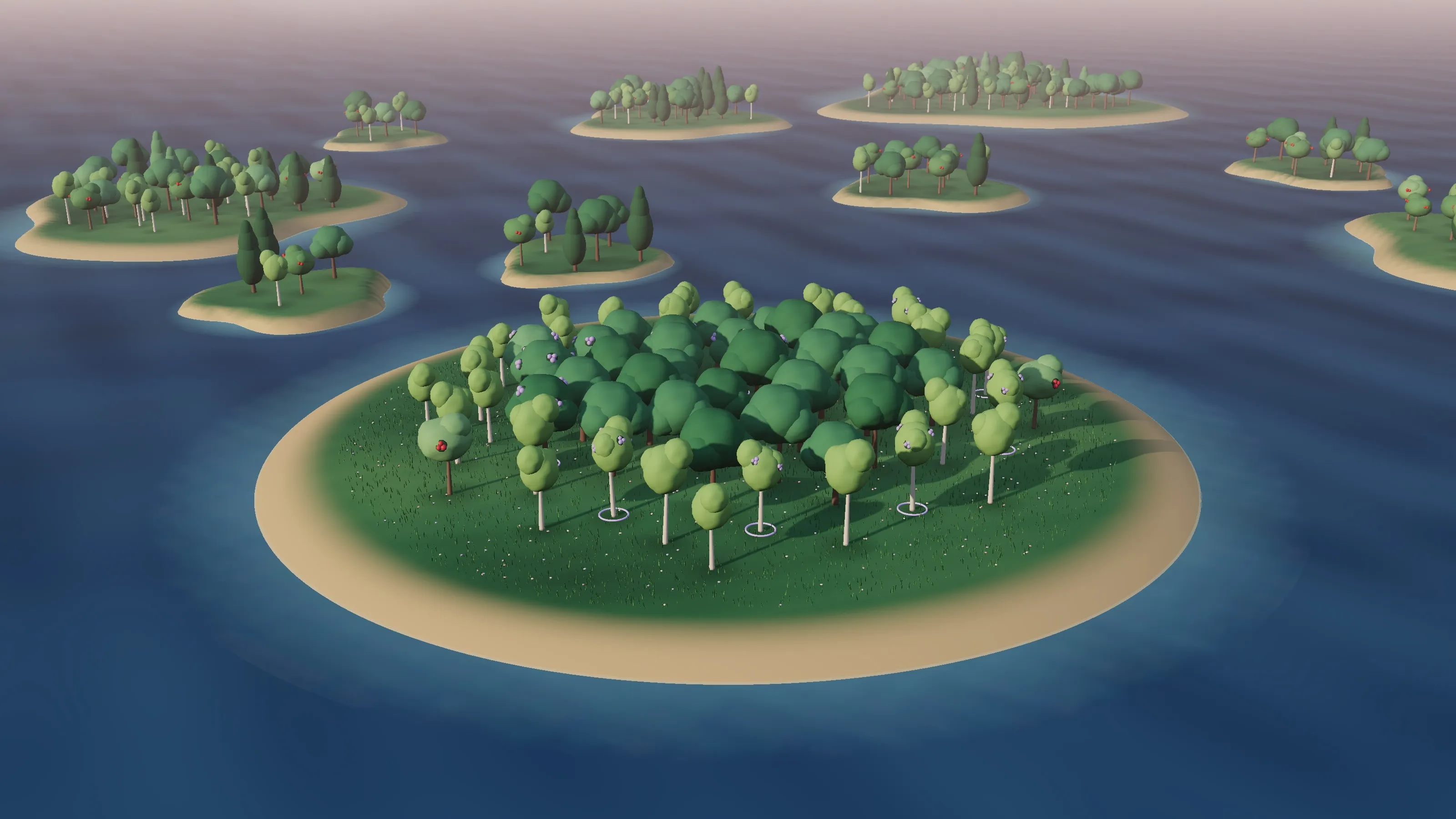
Today our service is fully digital, and every case your firm completes with us plants a real tree with our partner, Just One Tree. Now you can see those trees too. Each one grows in your firm’s own woodland, a small island in the MRC Forest that fills in, case by case, as your team works with us.
What is MRC Woodland?
MRC Woodland is your firm’s own woodland in the MRC Forest. Every case your firm completes with MRC adds a tree to it, matching the real tree we plant with Just One Tree. Each tree carries the initials of the fee earner on the case, so over time your woodland becomes a living record of the work your team has done with us.
The oldest trees stand in the middle and the woodland grows outwards, so its history reads from the centre to the shore. This year’s saplings look fresh and light beside the older trees, which have had time to fill out.
Why we plant a tree for every case
Our work once relied heavily on paper, and paper has a cost that goes well beyond the price of a ream. It takes trees, energy and water to make, more energy to print and transport, and space to store.
So we made two commitments. The first was to move to a fully digital service, which cuts the paper, energy and water our work uses. The second was to partner with Just One Tree and plant a tree for every completed case, aiming to offset our historical paper use and contribute to reforestation around the world.
Planting is the part of that commitment you can stand in. As they grow, those trees draw carbon dioxide out of the air, give wildlife somewhere to live and help forests recover. Your woodland is our way of showing your firm its share of that work, one tree at a time.
How does a completed case become a tree?
You don’t need to do anything. When we return a completed case, two things follow:
- A real tree is planted with Just One Tree.
- A matching tree appears in your woodland, labelled with the fee earner’s initials and its number in the woodland (PK1, PK2, PK3, and so on), along with the date it was planted.
Each tree is an oak, a birch, a rowan or a Scots pine, all familiar from British woodland. The rowans even carry their red berries.
How do I visit my firm’s woodland?
Go to my.mrcgroup.uk/woodland and enter your work email address. There’s no password to remember, no account to set up and nothing to download.
Your woodland is also a click away from two places you already use:
- A case’s progress page, where the fee earner on the case will find a woodland box.
- Your return emails, which carry a lasting link straight to your woodland.
Finding your own trees
The trees from your own cases carry lavender berries and a soft ring at their base, so you can pick out your work at a glance among your colleagues’ trees. Hover over any tree, or tap it, to see whose it is, what it is and when it was planted.
A little water, once a day
You don’t have to water your woodland, but it’s a nice habit to get into. Each person can water it once a day with a single tap, and you’ll see your own streak build each day you come back.
Watering works per person, so everyone at your firm can join in from their own link, and one colleague’s watering never uses up anyone else’s.
Part of the wider MRC Forest
Your woodland sits in the MRC Forest among the woodlands of the other firms we work with. You’ll see them around you as islands of their own, in all shapes and sizes, each one growing with its own cases. Only yours is marked as your firm’s; the rest are simply part of the view.
What stays private
Your woodland shows the trees and nothing about the cases behind them. A tree tells you the fee earner’s initials, its number, its species and when it was planted. Case numbers, client names, references and case types are never shown, and they’re never sent to your browser in the first place. When the cases behind the trees involve clinical negligence and personal injury, that’s the only way we’d want it.
Paperless from start to finish
The woodland is the visible end of a service that’s paperless all the way through. Records reach us by a secure route, and your completed bundle comes back digitally through the MRC Portal, ready to review, share and store without printing a page. Going fully digital speeds up case reviews, cuts printing costs and reduces the environmental impact of every case.
If your firm is still part way there, that’s fine. Whether you want to go completely paperless or simply use less paper, we can set up a secure workspace on the MRC Portal for your uploads, or work with records shared through your own portal.
Take a look at yours
If your firm has completed cases with us, your woodland is already growing. Visit your woodland with your work email, have a wander and give it some water while you’re there. There’s more about our tree planting on our One Tree Plan page.
When you’re ready for the next tree, send us your next case. And if you have a question about your woodland, call us on 0161 928 1636 or email info@mrcgroup.uk. We’re always happy to talk trees.
Questions solicitors ask
Does MRC Woodland cost my firm anything?
No. A tree is planted for every case we complete, at no extra cost to your firm, and visiting and watering your woodland is free.
Are cases from before the woodland launched included?
Yes. Cases we completed for your firm before the woodland launched have their trees too. Where we don't hold an exact return date for an older case, its tree reads 'planted by March 2025' instead of a specific day.
What if a case didn't have a named fee earner?
Its tree takes your firm's initials instead, so every completed case still has its place in the woodland.
Do the trees in my online woodland help the climate themselves?
No, and we'd never claim they do. Your online woodland is a record. The trees doing the real work are the ones planted with Just One Tree, one for each case your firm completes with us.
What does the 'Plant more trees' button do?
It opens our instruction form with your firm, name and email already filled in, so sending us your next case, and planting the next tree, takes a moment.